
Registrations for any Little Athletics Centre is handled through the one online registration portal. Please refer to the LAVic Centres page to check if your Centre’s registrations are open.
By clicking the button at the bottom of this page, you will first be prompted to select the Centre in which you are looking to join. After this, you will then need to fill in the form which will ask for details on a parent or guardian as well as the members who are being registered.
GOVERNMENT GRANTS /
Below are Government Grants that are available to assist you financially with your Season Registration.
FREQUENTLY ASKED QUESTIONS /
The Gameday registration and event system accepts payment by Credit Card and *BECS Bulk Electronic Clearing System (BECS) Direct Debit.
Credit card payments – are processed immediately and if successful marked as paid,
BECS Direct Debit payment – requests can take up to 3 days to process and cannot be marked as paid until the transaction has been cleared. Please note: if you nominate to pay by this method the member will not be marked as paid until the funds have cleared.
STEP 1: REGISTER YOUR FIRST MEMBER /
Select New Participant, then click NEXT. Follow the prompts and enter the information applicable to your first member.
STEP 2: REGISTER YOUR SECOND MEMBER /
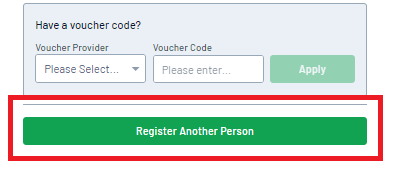
On the Summary page, click the REGISTER ANOTHER PERSON button. This will take you back to the beginning of the registration form to complete the details for your next registration. Click the New Participant option again, then select NEXT.
Note: You will see the first member appear as ADDED. This does not mean the member has been registered yet, rather, their details will be held on the registration form until the details for all necessary registrations have been completed.
STEP 3: REPEAT UNTIL YOU’VE ADDED DETAILS FOR ALL YOUR MEMBERS /
Repeat the registration process until you reach the Summary page. If you need to register more members, continue using the Register Another Person button until all members have had their details added to the registration.
STEP 4: COMPLETE YOUR PAYMENT /
Confirm that your information is correct, then select a payment method and click PROCEED TO PAYMENT. Confirm your payment method, enter your payment details, then click PAY NOW. You will then receive a confirmation email and payment receipt once registration is successful.
NATIONAL PARTNER

OTHER PARTNERS